


Why does the screen inside your monitor, laptop, and advertising machine light up?
Many people's first reaction is that the screen lights up when powered on. Actually, it's not.The LCD screen itself does not emit light at all.
It is not like OLED, where each pixel can light up on its own, nor is it like a light bulb that emits light when powered on.The LCD screen is more like a "dimming glass",It only controls how much light passes through, and what really makes it light up is the backlight module behind it that you can't even see normally.
We produce 10.1-32-inch LCD display modules,Dealing with manufacturers of monitors, laptops, advertising machines, and terminal device screens every day.
I'll use a sandwich today,Transform the LCD structureSpeak clearly and explicitly.By understanding these, you have a clear understanding when negotiating specifications with suppliers and explaining problems to customers.
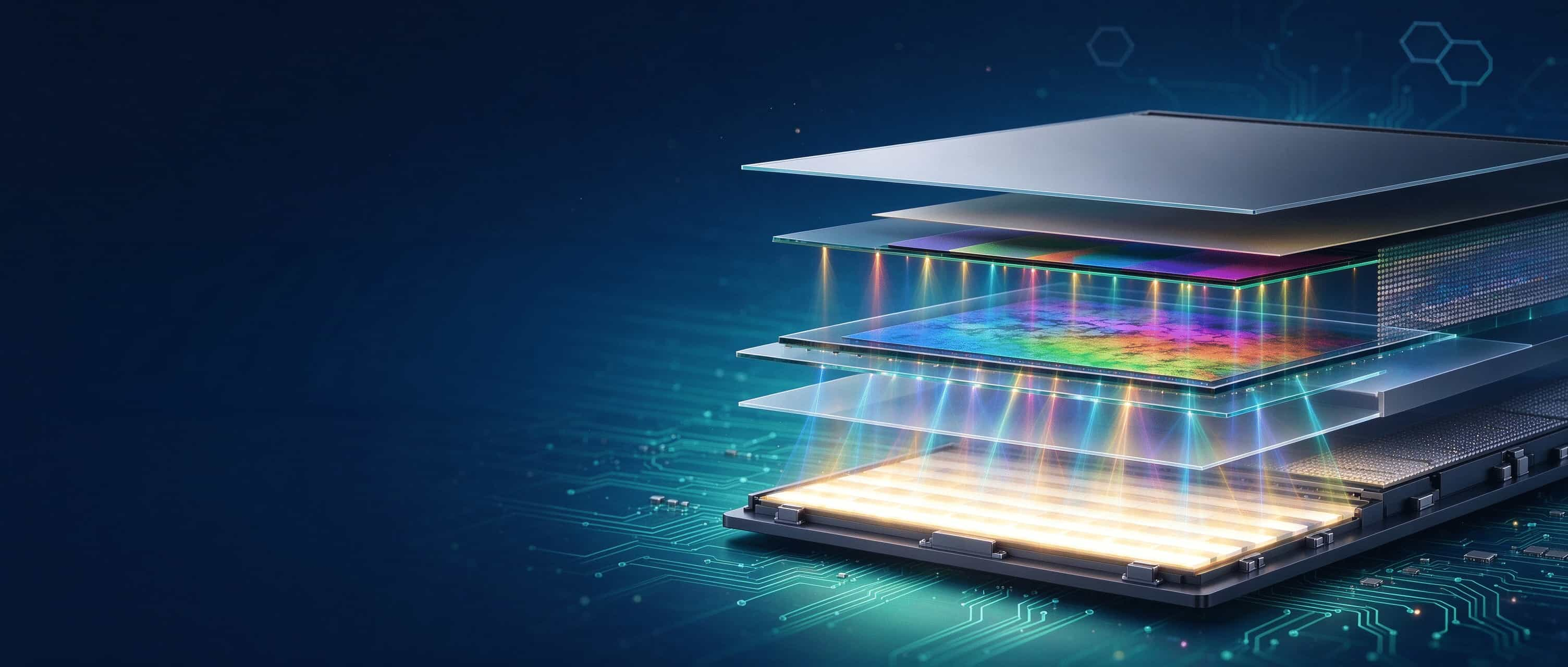
1、 Why do LCD screens need backlighting?
Liquid crystal, let's say it's a liquid, it also has a bit of a solid appearance; Let's say it's a solid, it can also flow. It doesn't emit light itself, but it has a skill:As soon as you give it electricity, the molecules inside it will turn around.
You can think of liquid crystal molecules as a group of soldiers listening to commands. Usually they are arranged in a spiral shape, like twisting Fried Dough Twists, and the direction of light will be twisted when it passes through; As soon as you shout the command (apply voltage), they collectively turn around and stand straight, and the way light passes also changes accordingly,What should be bright, what should be dark.
So the liquid crystal layer is like a 'light valve',Like a faucet, control how much light passes through. It cannot emit light on its own, it must have a light shining behind it.This light is the backlight module.
Without backlight, the LCD screen is just a blackboard. It's like a movie theater without a projector, no matter how big the screen is, it can't display the picture. You make monitors, make advertising machines,Customers complain that the screen is dark, yellow, and has light spots, and often the problem lies in the backlight layer.
2、 Think of LCD as a sandwich
A LCD display module with five core layers from bottom to top:
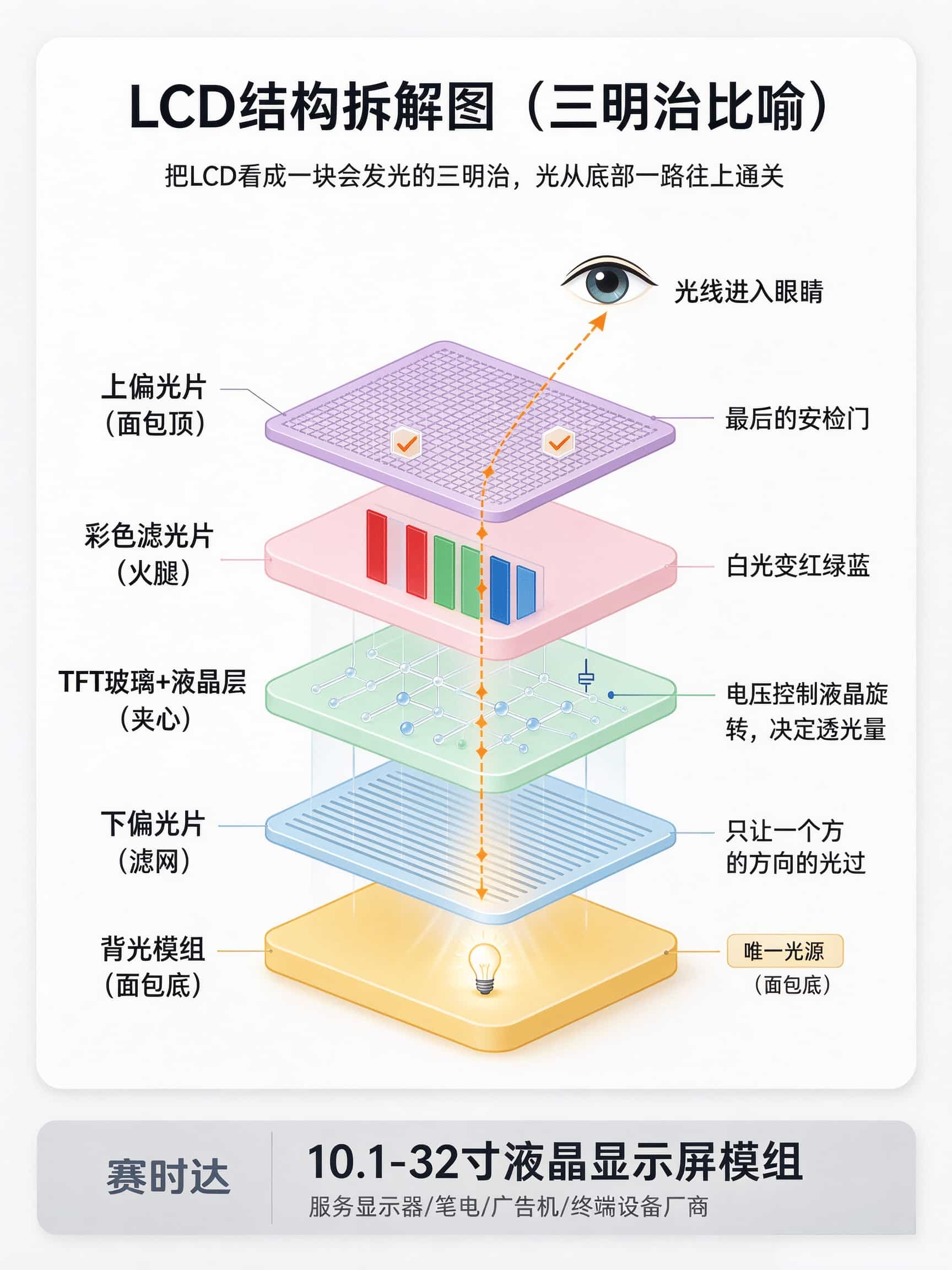
First layer (bottom): Backlight module (bread bottom)
Second layer: lower polarizer (filter)
Third layer: TFT glass substrate liquid crystal layer (sandwich)
Fourth layer: Color filter glass substrate (ham)
Fifth layer (top): upper polarizer (top of bread)
The 10.1-32-inch module we made during the game, upon opening, the skeleton consists of these five layers. Actually, it's more refined, but by grasping these five layers, we grasp the essence.
3、 How do these 5 floors work?
1. Backlight module: the heart of the screen
The backlight module is the only light source for LCD.There are usually LED beads, light guide plates, diffusion sheets, and brightening films inside. LED beads emit white light, the light guide plate spreads the light evenly, the diffuser softens the light, and the brightening film concentrates the light on the front, resulting in increased brightness.
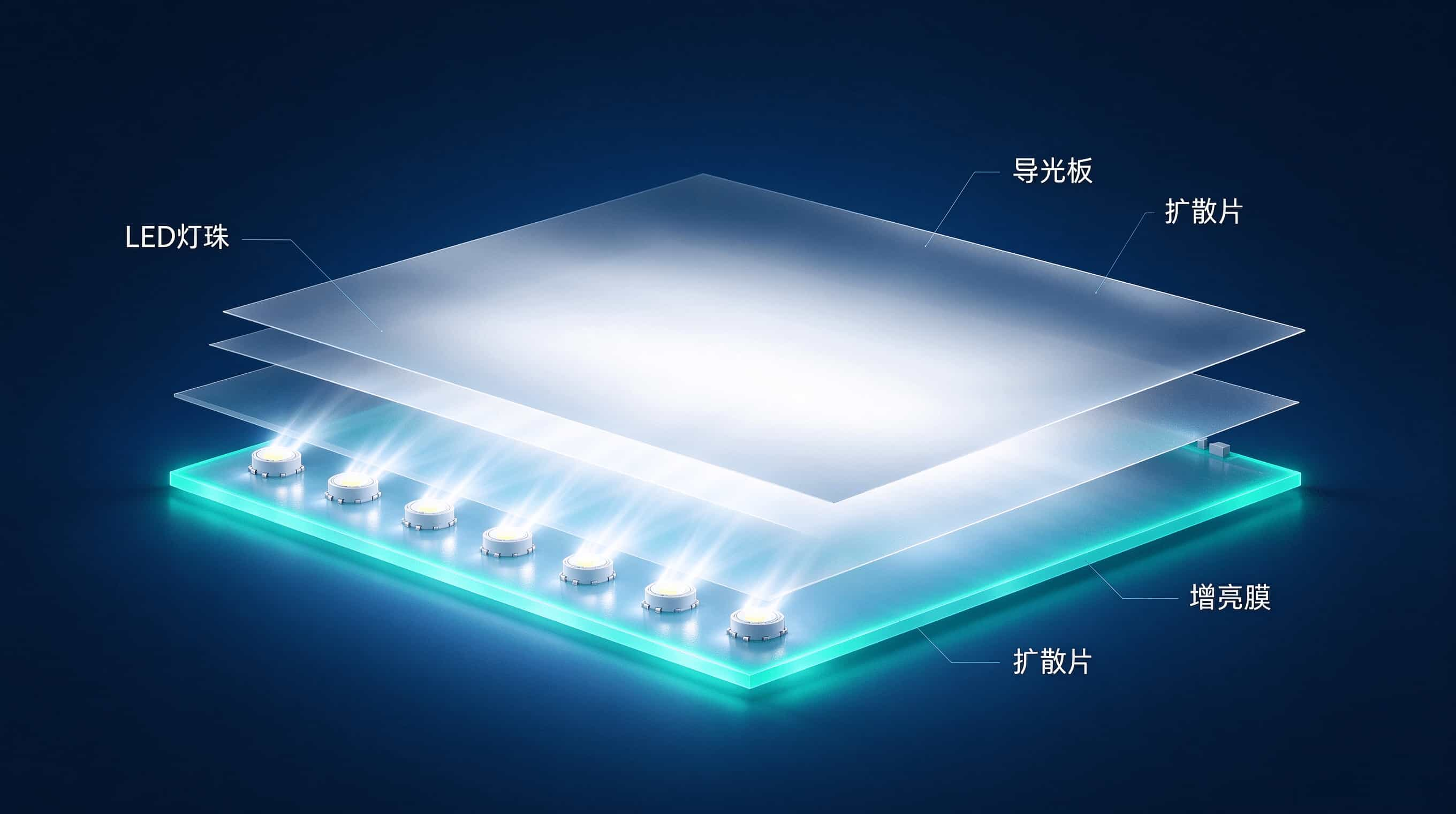
Without backlight, the screen is black. The quality of backlight directly determines brightness, uniformity, color gamut, and lifespan.
For outdoor use of advertising machines, the backlight should be bright enough to be visible at 1000 nits or more; The laptop should be lightweight and energy-saving, and the backlight should not be too thick or consume too much power; The monitor should have uniform colors, and the backlight should not be bright and dark at the same time.
We produce 10.1-32-inch modules, and the backlight solution can be customized according to your application. You make outdoor advertising machines, let's highlight them; You make a laptop, we make a thinner one to save electricity; You make the monitor, we ensure uniformity.
2. Polarizer: Allow only one direction of light to pass through
The light emitted by the backlight is messy and shaking in all directions. The polarizing film is like a fence, allowing only light that shakes in one direction to pass through. After that, the light becomes "linearly polarized light".
You can think of it as: a group of birds flying randomly, with a cage in front that only has one slit open, and only those flying in the direction of the slit can enter.
The angle and transmittance of polarizing film directly affect the brightness and contrast of the screen. Changing the polarizing film can sometimes solve the problem of unclear outdoor visibility.
3. TFT glass substrate liquid crystal layer: precision optical switch
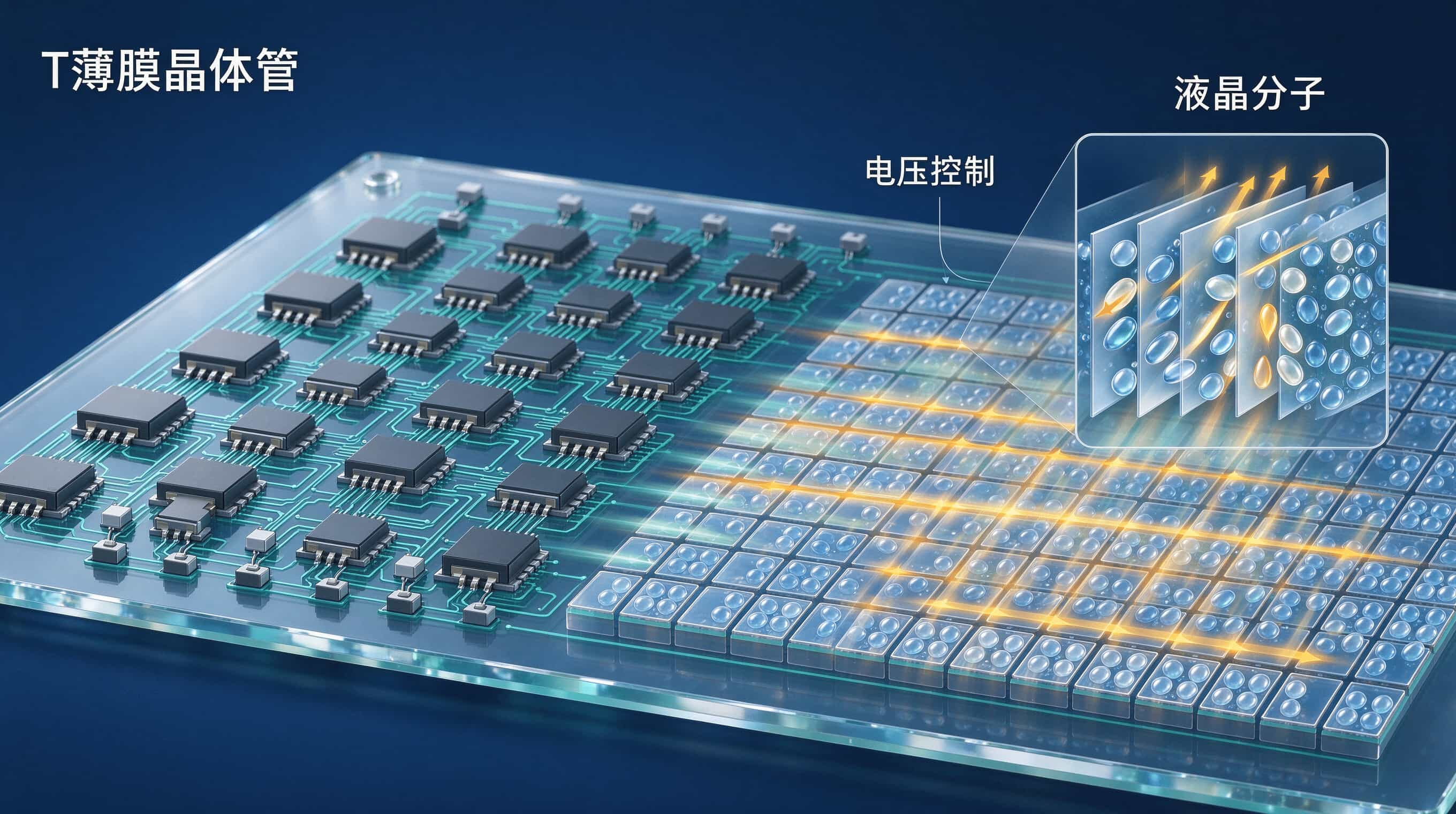
This layer is the core of LCD. On the TFT glass plate, there are densely packed thin film transistors, each corresponding to a pixel point, equivalent to a small switch. There is also a transparent ITO conductive layer on the surface of the glass, which applies voltage to the liquid crystal.
When the TFT is turned on, voltage is applied to the liquid crystal through ITO. Liquid crystal molecules rotate at different angles according to the magnitude of the voltage. The polarization direction of the light passing through is twisted at different angles depending on the angle of rotation.
Liquid crystal molecules are like blinds, where voltage controls the angle of the blades, thereby controlling the amount of light transmitted.
A laptop needs to respond quickly, a monitor needs to have accurate colors, and an advertising machine needs to run stably for a long time, all of which are related to the TFT and LCD materials on this layer. When selecting a screen, don't just look at the size, the driving scheme and LCD mode are equally important.
4. Color filter glass substrate: turns white light into color
It's still just light and dark here. To achieve color, one must rely on color filters. On this glass, each pixel is divided into three sub pixels: red, green, and blue, corresponding to red, green, and blue filters.
After the backlight white light passes through the liquid crystal layer and then through the color filter, it becomes red, green, and blue colors. Control the transmittance of each sub-pixel to blend millions of colors.
Color filters are like mosaics, breaking down white light into three primary colors and then reassembling them.
Display manufacturers care about color gamut, advertising machine manufacturers care about whether colors are bright or not, and pen manufacturers care about power consumption and color balance.
The same screen may have different color filter schemes, resulting in varying effects and costs. When discussing color gamut and color consistency with clients, this layer is crucial.
5. Polarizing film: the final security checkpoint
The polarization direction of the upper polarizer is usually perpendicular to that of the lower polarizer. This means that if the liquid crystal layer does not twist the light, the light will be blocked by the upper polarizer and the screen will display black; If the liquid crystal layer twists the light 90 degrees, the light will pass through smoothly and the screen will display white.
By controlling the voltage of each pixel, the light transmittance can be precisely controlled, displaying grayscale and images.
Polarizing film also affects contrast and anti glare. Outdoor advertising machines and industrial control terminals often need to be treated with anti glare, otherwise the sun will reflect all the light.
4、 How does light become an image?
The backlight emits white light, which first passes through the lower polarizer and becomes light with a uniform direction.
Then, through the liquid crystal layer, the TFT controls the voltage of each pixel, and when the liquid crystal molecules rotate, they determine how much light is emitted.
The light passes through the color filter and becomes red, green, and blue.
Finally, when passing through the polarizing film, the light should be bright and the dark should be dark, and the human eye can see the complete color image.
One sentence: Backlight emits light, LCD controls light, filter colors, eyes see pictures. LCD does not emit light, it only functions as a valve. Backlight is the real light source, LCD is just a valve.
5、 How many of these misconceptions have you stepped on?
Misconception 1: "LED screen" is a self luminous screen.
wrong. The vast majority of "LED screens" on the market are actually LCD screens with LED backlighting. The true self luminous is OLED. LED here is only a backlight source, not the pixel itself.
Misconception 2: If the LCD screen is broken, it must be the LCD that is broken.
not always. The backlight is broken and the screen has turned black, but upon closer inspection, there may still be a faint image. Polarizing film aging, screen yellowing, and decreased contrast. The liquid crystal layer itself is actually very durable.
Misconception 3: A high brightness screen is a good screen.
Highlighting means stronger backlight, but power consumption, heat generation, and lifespan are all affected. Outdoor advertising machines require high brightness, while indoor displays pursuing high brightness are a waste of money. Screen selection depends on the application scenario, not the brighter the better.
A LCD screen, in other words, is a backlight with two layers of polarizing film and two layers of glass LCD. Backlight provides light, polarizer filters light, LCD controls light, color filters provide color, and TFT is responsible for precise command.
It doesn't emit light, but it allows us to see the whole world. The structure is complex, but the principle can be explained clearly with a sandwich.
If you think this article has helped you understand the structure of LCD, please feel free to like and share it.
We will continue to discuss how to choose TFT, IPS, VA, TN, how to pair the interfaces, and how to verify the wide temperature range. I will explain the practical tips for making screens to you one by one.
#LCD Structure # LCD Module # Backlight Module # TFT LCD # LCM Module # LCD Display Screen # Industrial LCD Screen # Wide Temperature High Brightness # Advertising Machine LCD Module # LCD Backlight Principle