


The screen doesn't light up, the oscilloscope poked for half a day, the power is normal, the reset is normal, and the backlight is also on,But the picture just can't come out.
Are you starting to suspect that the initialization command is missing one byte? Or was the clock frequency miscalculated?
Don't rush to flip through the forum. 90% of "unlit" and "screen flickering" are not driver bugs, but rather you treat the screen parameters as Excel spreadsheets instead of a live theater map.
Let's imagine the LCD screen as a theater:Pixels are seats, timing is the rhythm of audience entry, and data channels are the highways that transport images
As long as this image stands in my mind, fields like hactive, pork, lane number, bpp... these days, like books, can all be seen through at a glance.
1、 What is screen parameter? A point screen map
Whether a screen can display normally is not just about whether the resolution is correct or not. The real screen tapping process is like an assembly line:
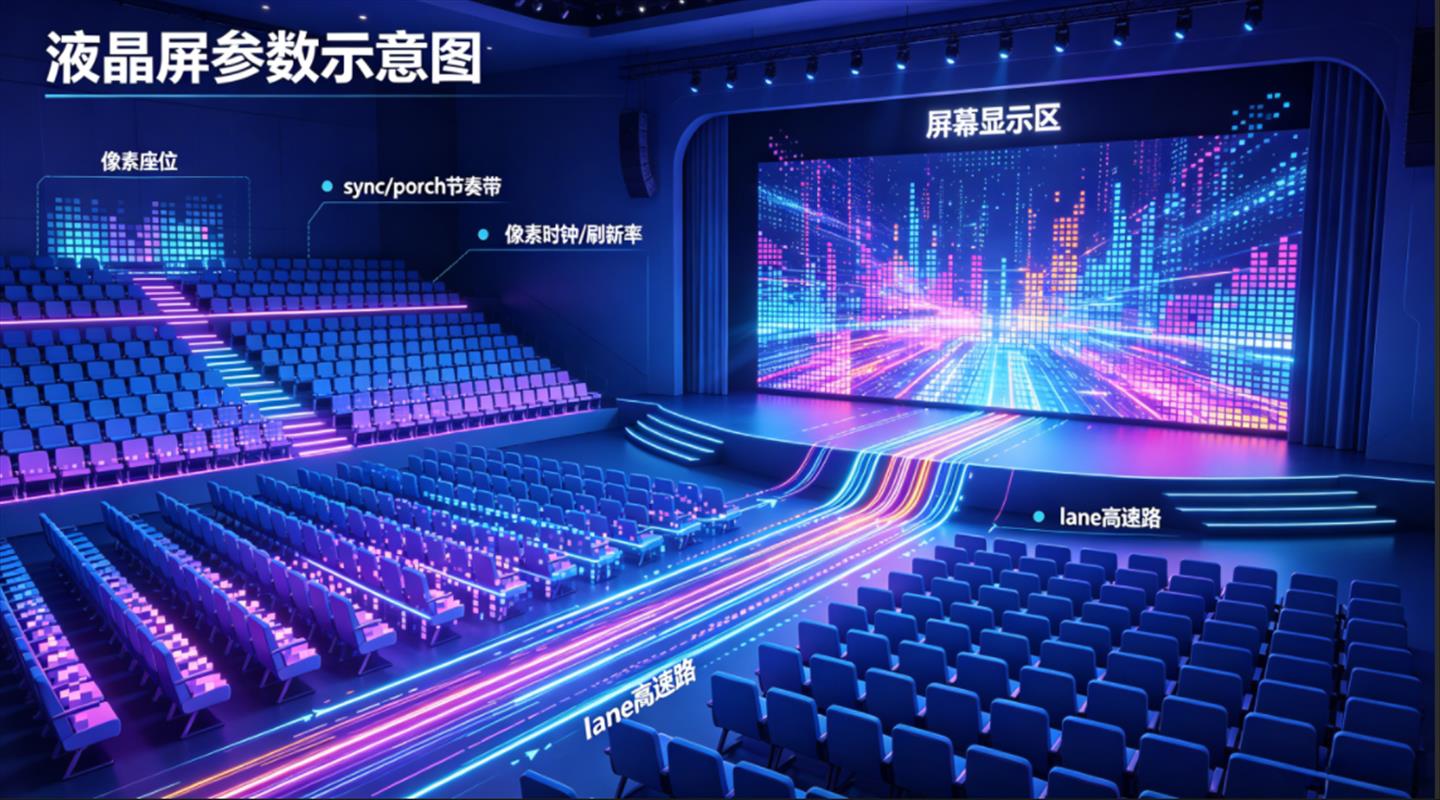
First, determine how many screens there are on this screenPixels,That is to say, how many screens are thereThe seat.
Decide how much to leave between each line and frame againbuffer timeThis isPorch and sync.
Then calculate how fast the screen should be displayedrhythmSend it out,Pixel clock and refresh rate.
Next, check how many lanes there are in the data channel and whether these pixels can be delivered to the screen on time.
If any of the rings are not aligned,The possible manifestations are all "abnormal screen": black screen, blurred screen, flashing screen, color cast, shaking.But the reasons behind it may be completely different.
Adjusting the screen is afraid of relying on intuition, so it's better to draw the map first.
2、 Resolution is the seating chart, and porch is the aisle
First, let's talk about the easy to understand resolution. For example, a 1920x1080 screen can be imagined as a theater: each row has 1920 seats, for a total of 1080 rows.
hactiveIt is the actual number of seats that can accommodate people in each row,vactiveHow many rows are there in total.
But a theater cannot have only seats. There should be aisles in front and behind the seats, and there should be a buffer when changing lanes. The staff also need to know when to start the next row and when to enter the next scene.
LCD is the same, there are several invisible but important periods outside the active area:
Hfront pole:The buffer between the end of a row of valid pixels and the beginning of the row synchronization signal.
Hsync len (line sync pulse width):Tell the screen the duration of the synchronization signal for 'line break now'.
Hback pole (trailing edge):The buffer between the end of the line synchronization signal and the start of the next effective pixel line.
The same applies to the vertical direction:Vfront march (frame leading edge), vsync len (frame synchronization pulse), vback march (frame trailing edge),Just replaced 'line break' with 'frame change'.
So 'pork' is not an unnecessary field.It is the breathing space during image scanning.Leaving too little, the screen rhythm is too fast; I left it wrong, the screen may be offset, shaky, or flickering.
A commonly used estimation formula:
htotal = hactive hfront_porch hsync_len hback_porch
vtotal = vactive vfront_porch vsync_len vback_porch
pclk_hz = htotal × vtotal × fps
Pixel clock can be understood as a metronome.It sends out a pixel every time it hits. The higher the resolution, the larger the porch, and the higher the refresh rate, the faster this metronome needs to be tapped.
In screen parameter configuration, the fields are usually long like this (taking LVDS as an example):
hactive = 1920
vactive = 1080
hfront-porch = 88
hsync-len = 44
hback-porch = 148
vfront-porch = 34
vsync-len = 5
vback-porch = 6
clock-frequency = 148500000
If only the resolution is changed without changing the slot and clock,It's like expanding the seating of a theater, but still releasing people according to the original entrance rhythm,It will eventually become chaotic.
3、 Data channels are like highways, BPP is like cargo weight
After discussing the timing sequence, let's talk about data transmission. There are currently two mainstream interfaces on the market:EDP and LVDS,Let's talk separately.
eDPIt can be imagined as a highway from the motherboard to the screen. It has 1 to 4 pairs of data lanes, each pair being a differential signal channel.
The advantages of eDP are fewer pins, low electromagnetic interference, support for high resolution, and high refresh rate.Most laptop screens use eDP because they have fewer cables and save space.
There are multiple speed options for eDP,Common options include 1.62Gbps (RBR), 2.7Gbps (HBR), 5.4Gbps (HBR2), and even higher 8.1Gbps (HBR3), depending on the resolution and color depth requirements.
LVDS is another differential signal transmission technology that is very mature in displays and large-sized screens.It also uses multiple lanes to transmit data, but the protocol is simpler and more direct, mainly transmitting raw pixel data.
The transmission rate of LVDS is generally between 155Mbps and 1.923Gbps,It is widely used in LCD displays of 18.5 inches and above.
Here are a few key parameters:
Number of lanes:There are several lanes.
EDP commonly has 1 lane, 2 lanes, and 4 lanes;
LVDS commonly uses single channel and dual channel.
Lane rate: How fast do you run on each lane.
BPP (bits per pixel): The weight of each pixel. RGB666 is 18bpp, RGB888 is 24bpp.
RGB888 has finer colors than RGB666 (8-bit per channel vs 6-bit per channel), but each pixel is also more "heavy". At the same resolution and refresh rate, RGB888 requires higher bandwidth.
Roughly estimate bandwidth demand:
pixel_rate = htotal × vtotal × fps
payload_bps = pixel_rate × bpp
Total required bandwidth=payload-bps× Encoding overhead (eDP and LVDS both have their own encoding methods)
If the bandwidth is not enough, it's like a traffic jam on the highway. Mild cases may include screen flickering, flickering, occasional shaking, and severe cases may not display directly.
Especially when a 4-lane screen is paired with 2 lanes and RGB888 is mistakenly paired with RGB666, it may cause confusion.
There is another very practical judgment:
Low refresh rate can light up and 60Hz splash screen;
Static images are okay, dynamic images flash;
Low resolution display, unstable real image;
This type of problem is often not caused by initialization commands, but by insufficient link throughput and timing margin.
4、 The initialization process is like a power on ceremony, if the order is wrong, the performance will not start
The screen cannot display as soon as it is powered on. It's more like a performance, and preparations need to be made in order before the opening:
Power on, the stage lights will turn on first. Reset, pull low and then high again, pull open the screen.
Send the init sequence, and the host will follow the process. Then the screen wakes up from sleep.
It was later announced that it could be officially displayed. The backlight is turned on, and the spotlight shines onto the stage.
The actual driving process is roughly as follows:
Step 1: Power on and wait for the power supply to stabilize
Power the screen (VDD, VDDIO, and other power rails), delay for 20ms, and wait for the power to fully stabilize.
Step 2: Reset
Pull down the reset pin and hold for 10ms
Pull up the reset pin and wait for 120ms
Enable the internal circuitry of the screen to complete initialization and reset.
Step 3: Wake up the screen
Send the Sleep Out (0x11) command to wake up the screen from sleep mode.
Delay for 120ms and wait for the internal oscillator of the screen to stabilize.
Step 4: Private Configuration
Send the initialization code provided by the screen manufacturer (including gamma correction, voltage regulation, interface format, and other parameters).
This step varies greatly among different screen manufacturers and models, and must be strictly followed according to the specifications.
Step 5: Allow Display
Send the Display On (0x29) command to inform the screen that "the screen is ready to display", with a delay of 20ms.
Step 6: Turn on the backlight
Then turn on the backlight PWM.
The backlight must be turned back, otherwise there may be a poor visual effect of "first turning on the white screen and then displaying the image".
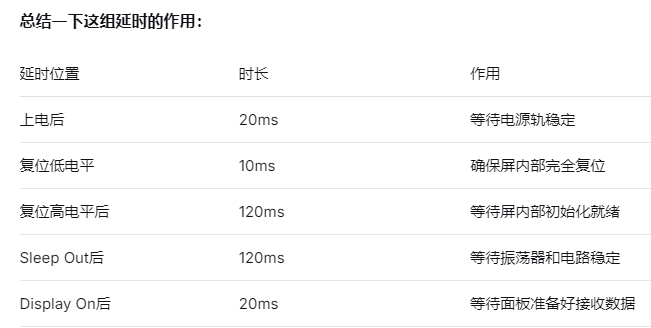
Reminder: The above delay values are common reference values, please refer to the specifications of the screen in your hand for details. The timing requirements of different screen manufacturers may varyBut after powering on, this 20ms delay is required by 99% of the specifications and cannot be saved.
Many screen manufacturers provide init codes that look like heavenly books, with a long string of hexadecimal commands that are difficult to read.
But don't rush to 'optimize' when transplanting. Some commands control gamma, some control power supply voltage, some control scanning direction, and some control interface format.
Missing one line, changing the order, or shortening the delay may cause the screen to enter a semi normal state.
The stable approach in engineering is to first transplant the initialization process of the screen factory as it is, so that the screen can light up steadily; Gradually clean up and annotate. Don't delete commands based on intuition in the first version.
5、 Translate phenomena back to parameters when problems arise
I'm afraid of hearing a sentence when adjusting the screen: 'If the screen doesn't light up, is there a problem with the driver?' This sentence is too big.A better way is to translate the phenomenon into possible parameter ranges.
If it's a black screen, first check if the power is up? Is reset polarity and delay correct? Is the backlight turned on? Have you sent out Sleep Out and Display On? Has the data channel truly entered high-speed transmission?
If it's a splash screen, first check if RGB666/RGB888 matches? Are the number and rate of lanes sufficient? Is the pork and pixel clock reasonable? Is the interface format command in initialization correct?
If the screen flashes or occasionally goes black, first check if the bandwidth margin is too tight? Is the TE (teaching effect) configured correctly? Has ESD testing misjudged? Is the power ripple, reset timing, and sleep wake process stable?
If it is color cast, first look at: RGB/BGR order, bpp configuration, color format in initialization, and pixel format in the controller.
You will find that screen scanning is not mystical. It's more like finding a breakpoint along a path: hardware first, then timing, then links, and then commands. If the order is correct, the problem will change from "a black ball" to "a mismatch in a certain section".
6、 Remember these metaphors, it's not difficult to memorize the screen parameters
Then collect a few key parameters again:
Resolution:The theater seating chart determines how many effective pixels there are.
porch:The aisle and buffer zone outside the seat determine whether the scanning rhythm is comfortable.
sync:The password for line breaks and frame changes tells the boundary of the screen rhythm.
pixel clock:Metronome, how many pixels beats per second.
Number of lanes:The number of highway lanes determines whether data can be transported over.
bpp:The weight of each pixel's goods, the finer the color, the heavier the goods.
Initialization sequence: The startup ceremony, sequence, and delay are all important.
LCD screen parameters are not a bunch of isolated numbers, they describe a complete collaboration from the motherboard to the screen: how the screen is queued, how data is transmitted, how the screen wakes up, and when the backlight is turned on.
Think about this picture clearly, then look at the specifications and screen configuration table, it will be much easier.
We, Saishida, are a professional manufacturer of LCD display modules,From laptop screens to monitor screens, from terminal devices to various display terminals, you can trust us to turn on the screen.
Are you sure about the screen parameter configuration? Welcome to contact us anytime, from interpreting specifications to sample screen debugging, one-stop solution.
#LCD # Screen Parameters # Screen Parameters # LCD Display Module # eDP # LVDS # Resolution # Display Interface # Dot Screen # Flower Screen